

A great website should feel like your best salesperson working all day without asking for coffee. These web design tips for small business owners are made for beginners who want a clear, modern, mobile-friendly site that explains what they do, builds trust fast, and helps visitors take action.
Start With Crystal-Clear Purpose
Every good small business website begins with one simple question: what should visitors do next?
Define Your Main Website Goal
Before choosing colors, fonts, layouts, or website builders, decide your main goal. Do you want visitors to book a consultation, request a quote, buy a product, call your store, join your email list, or visit your location? One clear goal makes your entire design easier to plan.
A service business may need online booking and a visible phone number. A product-based business may need clear product pages and a smooth checkout. A local restaurant may need menus, hours, directions, and reservation buttons. Your design should support real customer actions, not just look attractive.
Say What You Do Fast
Your homepage should explain what you do, who it is for, and why it matters within five seconds. This is where many small business websites lose visitors. A vague headline like “We Create Solutions” does not tell people enough.
Use a direct headline that names your service and audience. For example, “Custom Website Design For Local Service Businesses” is clearer than “Digital Experiences That Inspire.” Clear language builds trust because visitors do not have to guess.
Build A Homepage That Guides
Your homepage should feel like a simple path, not a puzzle.
Place Your Main Button Early
Add one strong primary button near the top of your homepage. This button should use action words like “Book A Consultation,” “Request A Quote,” “Shop Now,” or “Call Today.” Make sure it stands out and appears again as visitors scroll.
Your call-to-action button should never be too far away. If someone feels ready to act, they should not have to search for the next step. This small design choice can improve website conversions and reduce missed leads.
Arrange Sections In A Smart Order

A strong homepage usually starts with a clear headline, short supporting text, primary button, service overview, trust signals, customer reviews, business benefits, and contact options. This order helps visitors move from curiosity to confidence.
Do not put every detail on the homepage. Give enough information to create interest, then guide visitors to service pages, product pages, booking forms, or contact pages for the next step.
Make Mobile Design A Priority
Most customers will meet your website on a phone first.
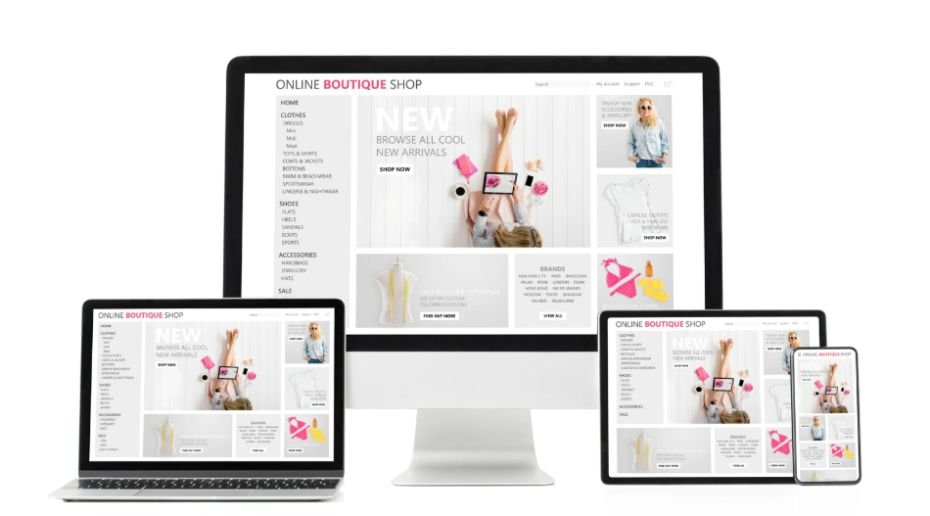
Use Responsive Web Design
Responsive web design means your site adjusts to different screen sizes. Text should be readable without zooming. Buttons should be easy to tap. Images should fit the screen without breaking the layout.
Small business owners often review their site on a laptop, but customers may be browsing during lunch, in a parked car, or while walking into your store. A poor mobile experience can make them leave before they understand your offer.
Keep Menus Short And Simple
Your header menu should usually have four to six main items. Good options include Home, Services, About, Reviews, Blog, and Contact. Simple website navigation helps users find what they need quickly.
Avoid stuffing the menu with too many links. Too many choices create confusion. A clean menu makes your website feel professional and helps search engines understand your structure better.
Use Space Like A Pro
Clean design is not empty design. It is focused design.
Give Content Room To Breathe

Whitespace is the open space around text, buttons, images, and sections. It makes your website easier to skim and more comfortable to read. Beginners often try to fill every corner, but crowded pages can feel stressful.
Good spacing helps visitors notice what matters. Your headline, service benefits, reviews, and call-to-action buttons become stronger when they are not trapped in clutter.
Choose Clean Fonts And Colors
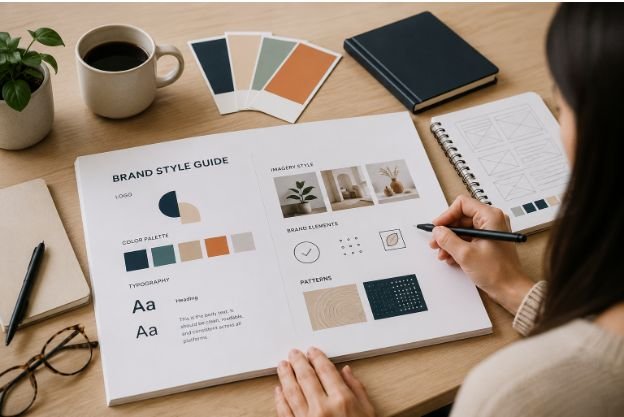
Stick to one or two fonts and a simple color palette. Too many fonts can slow your website and make your design look messy. Clean typography improves readability and gives your brand a polished look.
Use colors with purpose. Your main button should stand out from the rest of the page. Background colors, headings, and icons should support the brand without distracting from the message.
Turn Visitors Into Leads
Your website should help people take action, not just admire your design.
Limit Competing Choices
Every page should have a main action. If you add too many buttons, links, pop-ups, and offers, visitors may do nothing. This is called decision overload, and it can quietly hurt conversions.
For example, a service page should guide visitors toward booking, calling, or requesting a quote. A product page should guide them toward adding to cart or buying. Keep the next step obvious.
Add Booking Or Selling Tools Early
If you offer services, online booking can help people schedule even when your business is closed. If you sell products, ecommerce features should be easy to use from the beginning.
Do not wait until your website grows to add useful functions. A small business website should be practical from day one. Forms, booking tools, checkout pages, chat options, and clickable phone numbers can all support better customer experience.
Use Real Brand Proof
People trust websites that feel human, active, and honest.
Show Real Photos
Real photos of your team, workspace, products, projects, or location usually feel more trustworthy than generic stock images. Authentic images help customers imagine working with you.
You do not need a luxury photoshoot to start. Clear, bright, real pictures can make your small business feel approachable. For service businesses, before-and-after photos can be especially powerful.
Add Reviews And Trust Signals

Customer reviews, testimonials, certifications, awards, case studies, project examples, and client logos help visitors feel safer. These details show that real people have chosen your business before.
Place trust signals near decision points. Add reviews near service descriptions, contact forms, pricing sections, and booking buttons. This makes your design more persuasive without sounding pushy.
Speed Up Every Page
A beautiful website loses power if it loads slowly.
Compress Your Images
Large images are one of the biggest reasons websites become slow. Resize and compress photos before uploading them. Use the right file format and avoid adding huge images where small ones would work.
Fast loading speed improves user experience and supports SEO. Visitors are impatient online, especially on mobile. A slow site can make people leave before they even see your offer.
Avoid Heavy Design Extras
Animations, sliders, custom fonts, and too many plugins can slow your site down. Use effects only when they support the user experience. Simple often works better than flashy.
Small businesses do not always need custom-coded websites. Website builders like Wix, Squarespace, or similar platforms can offer mobile-friendly templates, SEO tools, and easy updates for beginners.
Add SEO From Day One
Good web design and SEO should work together from the start.
Use Search-Friendly Structure
Use clear page titles, helpful headings, simple URLs, internal links, image alt text, and focused service pages. These small steps help search engines understand your website.
Each main service should have its own page. This gives your site more chances to rank and helps visitors find exactly what they need without digging through one crowded services page.
Support Local Visibility
Local businesses should include city names, service areas, contact details, business hours, and location information naturally. Your website details should match your Google Business Profile.
A strong local web design strategy helps nearby customers find you, trust you, and contact you faster. This is especially useful for salons, contractors, clinics, restaurants, agencies, and home service businesses.
Frequently Asked Questions
1. What Are The 7 C’s Of Website Design?
The 7 C’s are clarity, consistency, content, credibility, conversion, customer focus, and convenience. They help a website feel trustworthy, easy to use, and focused on real business results.
2. What Is The 3 Second Rule In Website Design?
The 3 second rule means visitors should quickly understand what your website offers. Clear headlines, simple layouts, fast loading speed, and strong visual hierarchy help make that first impression count.
3. What Are The 5 Elements To A Good Website Design?
The five key elements are layout, navigation, content, visuals, and calls to action. These parts work together to guide visitors, build trust, and encourage them to take the next step.
4. Do I Need An LLC To Make A Website?
No, you do not need an LLC to make a website. You can build a site as an individual, freelancer, sole proprietor, startup, or registered business owner.
Final Click: Your Website Can Work Harder
A small business website should not just look nice. It should explain, guide, convince, and convert. The best web design tips for small business owners come down to clarity, mobile-friendly design, fast pages, simple navigation, real trust signals, and strong calls to action. Build for real people first, and your website becomes a practical growth tool.